technology
B2B agent portal
With a B2B agent portal your sub-agents book flights, hotels and tours at your prices. You manage each agent’s balance, commission and sales from one panel.
- UsersSub-agents, corporate clients
- ProductsFlights, hotels, tours, visas, insurance
- FinanceDeposit balance, credit limit, invoices
- PricingCommission and markup per agent
- Timeline and priceIn a written proposal after the specification
How the B2B agent portal works
Each agency logs into its own account and sees flight, hotel and tour offers from your suppliers at the net price you set. Bookings are paid from the agent’s balance or credit limit.
Commissions are calculated automatically by agent, destination and product. Debts, payments and sales statistics are visible both in your panel and in the agent’s account.
When a credit limit is reached or a payment is late, the system notifies the agent and you, and can pause new bookings if needed. This keeps debts from growing unchecked, and settlements are recorded automatically in the accounting module.
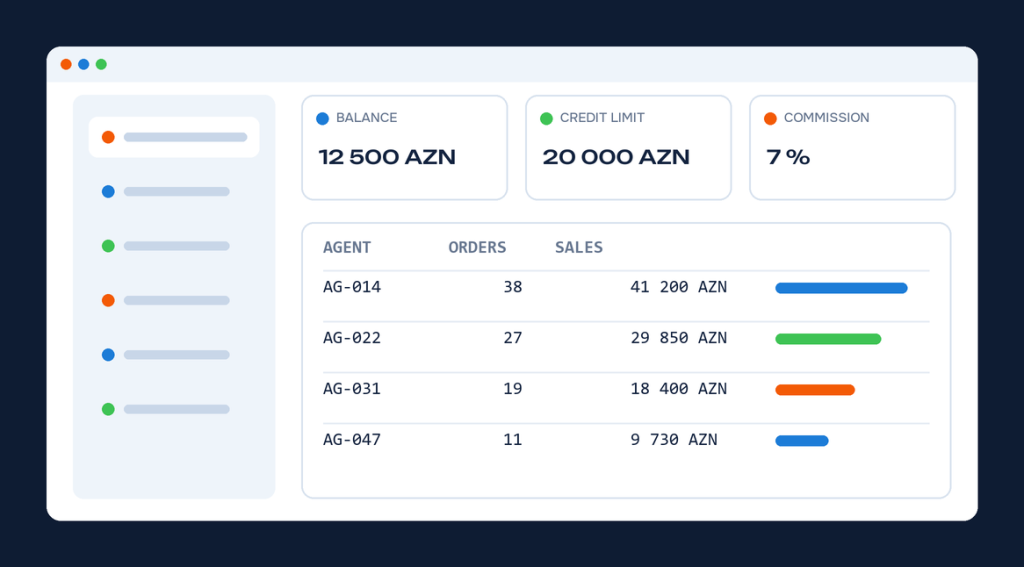
What the portal does
Your agent network grows while you stay in control.
Agent account
Each agent searches, books and tracks orders with their own login.
Balance and credit
Sales are deducted automatically from the agent’s deposit or credit limit.
Commission rules
Different commissions and markups are set per agent group.
Sub-users
Agency staff get separate accounts and permissions.
Reports
Sales, debt and payment reports per agent.
Who it is for
This solution simplifies daily work for these companies.
Consolidators
For companies that share GDS access with a network of sub-agents and track each agent’s sales.
Tour operators
For operators that sell tours to agencies at net prices and want commissions calculated automatically.
Branch networks
For companies with several offices that want to see each branch’s sales separately.
How we get started
You know what is ready at every stage; timeline and price are agreed in writing beforehand.
Rules
We define agent groups, commissions and the credit policy.
Products
We connect the flight, hotel and tour modules sold in the portal.
Agents
We add the first agents and send them access and instructions.
Control
We set up reports and debt alerts.
Frequently asked questions
Did not find your question? Message us on WhatsApp.
How do we onboard new agents?
An agent sends a sign-up request on the website, or you add them in the panel. After approval the login details are sent automatically.
What price do agents show to their customers?
Agents see the net price and can add their own markup. They can use their own logo on documents if they wish.
Is it the same system as the B2C website?
Yes. The core is the same, so products, pricing rules and reports are managed in one place.
How is an agent’s balance topped up in the B2B agent portal?
The agent pays by bank transfer or card, and the balance increases automatically once you confirm the payment.
Can agents add their own staff?
Yes. The agency creates sub-users in its account and sets their permissions itself.
Can agents use the portal under their own brand?
A separate address or a page with the agent’s own logo can be set up. This is agreed in the project specification.
Related solutions
Modules most often used together with this service.
Articles on this topic

What is Amadeus: a practical guide for travel agencies
What Amadeus is and how it works: connecting an agency, Selling Platform Connect vs API, IATA requirements and selling Amadeus fares on…

What is a GDS: the history of reservation systems from Sabre to NDC
What a GDS is and how reservation systems evolved: SABRE, Amadeus, Galileo, Worldspan, the Travelport mergers and NDC, and what it means…
How to choose a booking system: 10 questions to ask before you buy
How to choose a booking system: 10 questions on sources, payments, pricing rules, B2B, post-booking work, reports, total cost and support, plus…
Let us show you the system live
A 30-minute online demo: search, booking, ticketing and reports.