Short answer: Learning Amadeus means three things: working in Selling Platform Connect, knowing 30–40 core cryptic commands, and following the booking sequence. That sequence is availability, sell, passenger details, pricing, saving the PNR and ticketing. The official routes are Amadeus’ own learning platform (for agency staff), schools that partner with Amadeus, and IATA’s diploma course with an Amadeus simulation. The official certification requires a score of at least 80% on Amadeus’ Selling Platform Connect test. Below are the commands by group, with examples. You can download all of them as a PDF cheat sheet.
Last checked: 31 October 2026. TT Coders is not an Amadeus training partner. This is a practical guide for agents. Check the current options of each command in the system with HE (help).
How Amadeus is used: graphic mode and commands
The agent’s workplace is Amadeus Selling Platform Connect. Nothing is installed on the computer: it opens in a browser, and each user has their own user name and password. It has two modes:
- Graphic mode: search forms, buttons and lists. Easier for beginners.
- Command mode (cryptic): short typed entries such as
AN20NOVGYDIST. Experienced agents work faster this way, because one line does the work of several clicks.
According to Amadeus’ own description, Selling Platform Connect lets you switch freely between cryptic commands and the graphic interface, with no need to learn new formats. In other words, commands are not outdated: an agent who works in graphic mode is still faster when they know them.
For Amadeus itself, what a GDS is and how an agency connects, see our separate guide: What is Amadeus and how does it work.
Where to learn Amadeus
| Route | For whom | What you get |
|---|---|---|
| Amadeus Learning Universe | Staff of agencies that are Amadeus customers | Amadeus’ own learning platform, with instructor-led and self-paced learning paths, opened with a Service Hub account (Amadeus) |
| Amadeus education partners | Students and individual learners | Colleges and training centres get the Amadeus training environment and more than 110 lessons. Individuals are advised to enrol in such a partner’s programme (Amadeus) |
| IATA: Foundation in Travel and Tourism with Amadeus Diploma | Newcomers to the industry | About 200 hours of self-study, with a module that simulates the Amadeus environment. Price USD 615 or 780, online exam (IATA) |
| On-the-job learning | New agency employees | The fastest route: real bookings, an experienced colleague and the agency’s Amadeus access |
Official certification: Amadeus issues the “Amadeus Certified Professional: Reservations and Ticketing” badge. It requires a score of at least 80% on the Selling Platform Connect certification test. The learning paths and agent experience are recommended but optional (Credly).
In Azerbaijan: Amadeus has an office in Baku (amadeus.com). If your agency is an Amadeus customer, ask there first about staff training. When choosing a private course, ask whether lessons run in a real Selling Platform Connect training environment or only on slides.
A learning plan in 6 steps
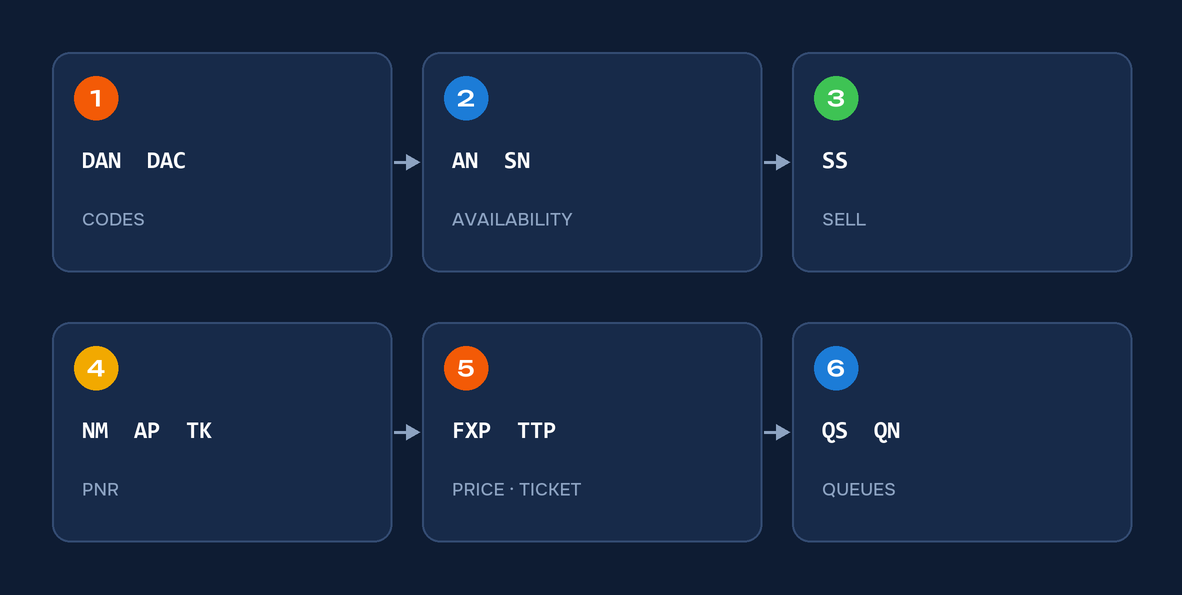
- Codes: recognise city, airport and airline codes (GYD, IST, J2).
- Availability: see flights and free seats by date and route.
- Selling: take a seat on the chosen flight.
- PNR: name, contact, ticketing time limit and saving the booking.
- Pricing and ticketing: price the fare, read its rules and issue the ticket.
- Queues and changes: handle airline schedule changes, change and cancel bookings.
At each step, learn 3–5 commands first and repeat the same booking several times a day in the training environment. If PNR terms (segment, TST, time limit) are new to you, start with our travel technology glossary.
Core commands
The examples use the Baku (GYD) – Istanbul (IST) route and a made-up passenger. Command formats follow the quick reference guides published by Amadeus.
1. Finding codes
| Command | Example | What it does |
|---|---|---|
DAN |
DAN BAKU |
Finds the code of a city or airport |
DAC |
DAC GYD |
Shows which city or airport a code is |
DNA |
DNA J2 |
Decodes an airline code or finds the code by name |
DC |
DC AZ |
Decodes a country code |
DNE |
DNE 320 |
Decodes an aircraft type |
2. Availability and schedules
| Command | Example | What it does |
|---|---|---|
AN |
AN20NOVGYDIST |
Shows free seats by date and route |
AN…/A |
AN20NOVGYDIST/AJ2 |
The same search for one airline only |
SN |
SN20NOVGYDIST |
Shows the flight schedule |
TN |
TN20NOVGYDIST/AJ2 |
Shows the airline’s timetable on the route |
MD / MU |
MD |
Moves the display down or up |
MN / MY |
MN |
Shows availability for the next or previous day |
AC |
AC22NOV |
Changes the date or airline of the last search |
3. Selling
| Command | Example | What it does |
|---|---|---|
SS |
SS1Y1 |
Sells 1 seat in Y class on the flight in line 1 of the display |
SS…/PE |
SS1Y1/PE |
Waitlists if no seat is available |
4. Passenger details and the PNR
| Command | Example | What it does |
|---|---|---|
NM |
NM1MAMMADOV/ELVIN MR |
Adds the passenger name: surname/first name and title |
NM (two people) |
NM2ALIYEVA/LEYLA MRS/KAMAL MR |
Two passengers with the same surname |
NM (child) |
NM1MAMMADOV/AYAN MSTR(CHD/05MAY18) |
Child, with date of birth |
NM (infant) |
NM1ALIYEVA/LEYLA MRS(INF/SARA/10JAN26) |
Adult travelling with an infant |
AP |
APM-GYD 994500000000 |
Mobile phone. AP alone adds the agency’s profile phone |
APE |
APE-ELVIN@EXAMPLE.COM |
Email address |
TK |
TKTL15NOV/1200 |
Ticketing time limit. Once ticketed: TKOK |
RF |
RF ELVIN |
Records who requested the booking |
SRDOCS |
SRDOCS J2 HK1-P-AZE-C01234567-AZE-15MAR90-M-15MAR32-MAMMADOV-ELVIN/P1 |
Passport details (APIS): document type, issuing country, number, nationality, date of birth, gender, expiry date, surname, first name |
ER / ET |
ER |
Saves the booking. ER redisplays the PNR, ET closes it without redisplaying |
IG / IR |
IG |
Ignores unsaved changes. IR redisplays the PNR |
RT |
RT X7K2LM, RT/MAMMADOV |
Retrieves a booking by record locator or surname |
XE |
XE4, XE4-6 |
Cancels element 4 of the PNR, or elements 4–6 |
XI |
XI |
Cancels the whole itinerary (all segments) |
The most common mistake is not saving the booking with ER or ET: the seats are then not kept in a PNR. The second is not watching the time limit: if the ticket is not issued in time, the airline may cancel the seats.
5. Pricing and fare rules
| Command | What it does | When to use it |
|---|---|---|
FXP |
Prices the booked class and creates a TST (stored fare record) | Before ticketing |
FXX |
Only shows the price, creates no TST | To quote a price to a customer |
FXB |
Rebooks to the lowest available class and creates a TST | When the customer wants the cheapest option |
FXA |
Lists lower fares. Then FXU2 picks option 2 and creates a TST |
To compare several options |
FQD |
Displays fares, for example FQDGYDIST/AJ2/D20NOV |
To look at fares without booking |
FQN |
Displays fare rules, for example FQN2 |
To read change, refund and baggage conditions |
TQT |
Displays the stored TST | To check the price before ticketing |
6. Ticketing, queues and help
| Command | Example | What it does |
|---|---|---|
TTP |
TTP |
Issues the ticket from the TST |
TWD |
TWD |
Displays the e-ticket record |
QT |
QT |
Shows how many items are in the queues |
QS |
QS8C1 |
Starts working queue 8, category 1 |
QN / QF |
QN |
QN removes the item and moves to the next, QF finishes and leaves the queue |
HE |
HE FXP |
Opens the help page of a command |
GG |
GG AIR J2 |
Opens Amadeus information pages, for example about an airline |
Voiding, refunding and reissuing tickets depend on the country, on whether you ticket through IATA (BSP) or on airline stock, and on the agency’s permissions. For example, according to Amadeus’ documents, automated refund access is granted at office level. Learn these operations from your agency’s rules and the HE pages.
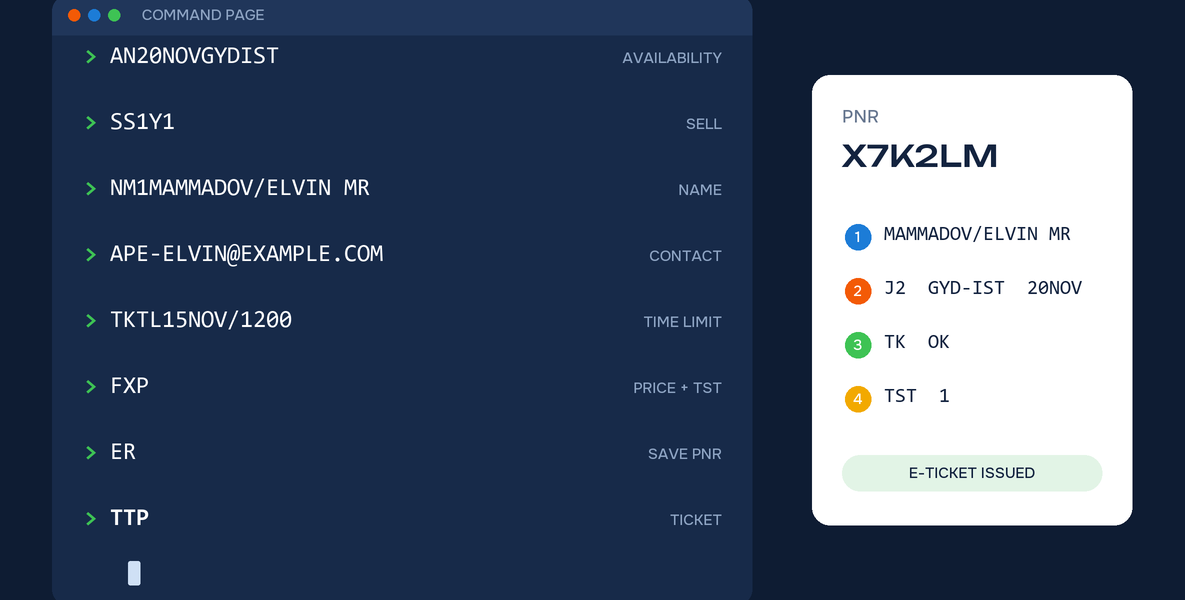
Example: a Baku – Istanbul booking in 9 steps
| Step | Command | Result |
|---|---|---|
| 1 | AN20NOVGYDIST |
Free seats on 20 November |
| 2 | SS1Y1 |
1 seat on the flight in line 1 |
| 3 | NM1MAMMADOV/ELVIN MR |
Passenger name |
| 4 | APM-GYD 994500000000, APE-ELVIN@EXAMPLE.COM |
Phone and email |
| 5 | TKTL15NOV/1200 |
Ticketing time limit |
| 6 | RF ELVIN |
Who requested it |
| 7 | FXP |
Price and TST |
| 8 | ER |
The PNR is saved and a 6-character record locator is created |
| 9 | TTP |
The ticket is issued |
Once this sequence is in your memory, the other commands are learned around it: children and infants, passport details, the lowest fare, changes and queues.
Download the commands as a PDF cheat sheet
All the commands above and the sample booking are on a 2-page cheat sheet. Print it and keep it at your desk, or send it to a new colleague. Free, no registration.
From the terminal to automated online sales
Knowing the commands matters for an agent, but as an agency’s sales grow, issuing every ticket by hand gets harder. When customers find and pay for a flight on your website themselves, the system performs the 9 steps above automatically through the Amadeus API: availability, booking, pricing, payment and ticketing. Agents keep their time for changes, group bookings and complex itineraries.
TT Coders builds Amadeus, Sabre and Travelport integrations for travel companies. How it works and what it costs: flight booking system and how much a flight booking system costs. On choosing a GDS: Amadeus vs Sabre vs Travelport.
Frequently asked questions
Can I learn Amadeus at home?
The theory and the commands, yes. IATA’s diploma course with an Amadeus simulation is designed for self-study. But practice in the real Selling Platform Connect needs access to a training environment, which comes from an agency that is an Amadeus customer or from an Amadeus education partner.
How long does it take to learn Amadeus?
There is no official duration. IATA’s course with an Amadeus simulation assumes about 200 hours of self-study, of which the simulation module takes up to 45 hours. The time depends mostly on daily practice: repeating the 9 steps of a simple booking every day is the fastest way.
Is there an official Amadeus certification?
Yes. The “Amadeus Certified Professional: Reservations and Ticketing” badge requires a score of at least 80% on the Selling Platform Connect certification test.
What is the difference between FXP and FXX?
FXP prices the booking and creates the TST record needed for ticketing. FXX only shows the price and stores nothing. Use FXX to quote a price and FXP before issuing the ticket.
How can I check that a command is right?
Type HE followed by the command in the system, for example HE AN or HE FXP. The help page shows all the options. Some operations, such as refunds, depend on the agency’s permissions.